
Most hypervisor decisions don't get made. They get inherited, deferred, or forced by a renewal notice. Whoever set up the platform five or seven years ago made a reasonable call at the time, and nobody has revisited it since, because revisiting it means opening a conversation nobody wants to have on top of everything else on the list.
That's a problem, because a hypervisor decision is one of the few infrastructure choices that's genuinely hard to walk back. Get it wrong, and you're not looking at a quick fix. You're looking at a multi-year commitment to a platform that shapes your licensing costs, your team's skill set, your backup and disaster-recovery architecture, and how much you rely on outside support to keep it running.
This isn't a sales pitch for one platform. It's the comparison we'd want to see if we were the ones making the call: what each option actually does well, where it falls short, and what should decide which one fits your environment.
If you're here because a VMware renewal number just landed on your desk, we've written specifically about that shift and what's behind it. This piece is broader; it's for anyone evaluating a hypervisor decision, whatever's prompting it.
Why this decision is harder to undo than it looks
A hypervisor sits underneath everything else. Your backup strategy is built around it. Your disaster recovery plan assumes it. Your team's operational knowledge is built around its quirks, its management tools, and its failure modes. Storage and networking are often configured specifically to suit it.
Change the hypervisor, and everything comes up for review, not just the virtualisation layer itself. That's not a reason to avoid change when change is warranted. It's a reason to make the decision deliberately, with a clear view of the trade-offs, rather than defaulting to whatever's already there or whatever a vendor's sales team is pushing hardest this quarter.
The four platforms worth putting on the table
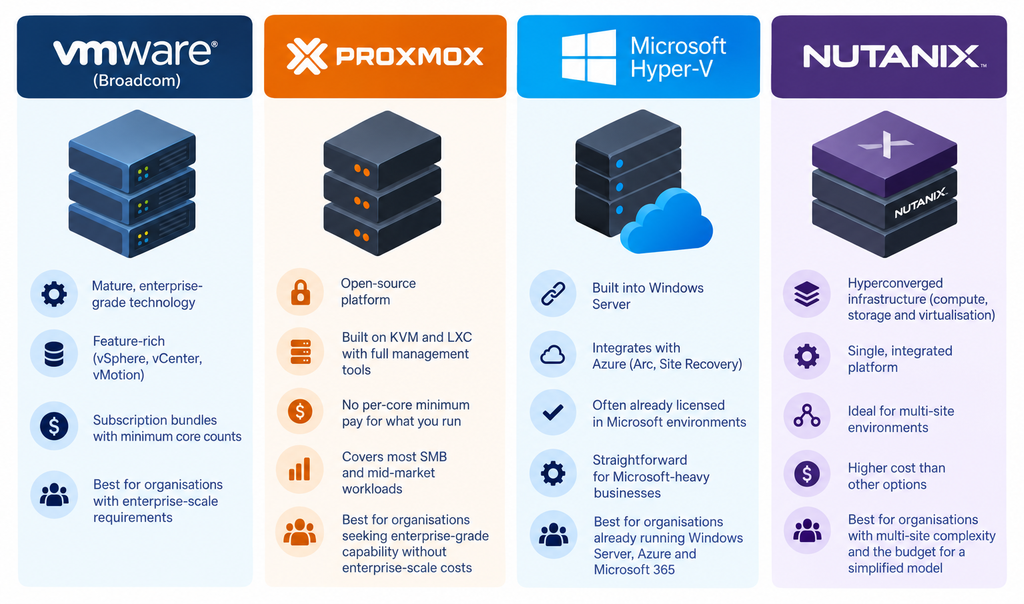

VMware (Broadcom)
VMware remains the platform most Australian mid-market businesses run today, and for a long time, it was the safe, uncontested default. The engineering behind it is mature: vSphere, vCenter, vMotion, and the broader VMware Cloud Foundation stack cover enterprise-scale requirements that few competitors match, feature for feature.
The commercial model is the issue, not the technology. Since Broadcom's acquisition, VMware has moved from perpetual licensing to mandatory subscription bundles with minimum core counts, meaning smaller environments increasingly pay for capacity and features they'll never touch. We've covered the specifics of that shift and what it means for a renewal decision in detail here, worth reading in full if VMware licensing cost is the trigger for this evaluation.
Best fit: organisations already deep in the VMware ecosystem with genuine enterprise-scale requirements, heavy reliance on advanced features like stretched clusters, NSX networking, or specific certifications tied to regulatory or vendor requirements, where the cost of retraining and migration outweighs the licensing premium.

Proxmox VE
Proxmox is open-source, built on KVM for virtualisation and LXC for containers, with native clustering, live migration, high availability, backup and software-defined networking (SDN).
It supports local, shared SAN and hyperconverged storage using Ceph, enabling the reuse of existing shared SAN infrastructure rather than replacing it during migration. Built-in VMware ESXi import tools also provide a more direct migration path for existing VMware environments.
Proxmox can be used without a paid subscription, making it well-suited for test and development environments, while commercial subscriptions add enterprise repositories and support for production workloads.
For most SMB and mid-market workloads, Proxmox covers the core virtualisation requirements without the enterprise feature bundles and licensing overhead that many smaller environments don't need.
Best fit: organisations looking for flexible, enterprise-grade virtualisation with lower licensing costs, particularly where existing storage can be reused, or VMware migration is a priority.

Microsoft Hyper-V
Hyper-V is Microsoft's native hypervisor, built into Windows Server and licensed as part of the broader Microsoft ecosystem. For businesses already committed to Microsoft 365, Azure and Windows Server as their core stack, Hyper-V has a genuine advantage: it's already licensed in many Windows Server editions, integrates natively with Azure hybrid tooling like Azure Arc and Azure Site Recovery, and doesn't introduce a second vendor relationship for a business that's already standardised on Microsoft.
The trade-off is that Hyper-V's management tooling (System Center Virtual Machine Manager, in particular) is less commonly deployed at SMB scale, and businesses without deep Microsoft-stack investment elsewhere don't gain much advantage from Hyper-V specifically over the alternatives.
Best fit: If you’re already running a Microsoft-heavy stack, Windows Server, Azure, Microsoft 365, where Hyper-V's native integration outweighs the benefit of a purpose-built hypervisor platform.

Nutanix
Nutanix is a hyperconverged infrastructure (HCI) platform. It bundles compute, storage and virtualisation into a single integrated stack, rather than running a hypervisor over infrastructure you've assembled and managed separately. That integration is genuinely valuable for businesses that want a single vendor relationship and a simplified operational model, particularly across multiple sites.
It also carries a higher cost floor than the other three options here and operates within a more controlled hardware ecosystem. Nutanix offers its own NX appliances, while also supporting selected hardware platforms from vendors including Dell, HPE, Lenovo, Fujitsu and Cisco. For most 10- to 250-seat Australian businesses, Nutanix's strengths solve a scale or multi-site complexity problem that most don't have yet.
Best fit: those running hyperconverged infrastructure already, or businesses with multi-site complexity and the budget to prioritise operational simplicity over cost efficiency.
What should actually decide this, not what usually does
The platform decision is usually made based on whichever consideration is loudest at the time: the renewal invoice, a recommendation from a reseller, or whatever the last IT hire happened to know already. None of those is wrong exactly, but none of them is the full picture either. Five things actually matter:
● Current environment size and where it's heading
A platform sized for where you are today and undersized for where you'll be in three years creates the same problem you're trying to solve now, just later and under more pressure.
● Your team's technical depth, honestly assessed
Self-managing a hypervisor is a different proposition to running one with a managed services partner behind it. Neither is wrong, but the platform decision should match the operational reality, not an aspirational one.
● Total cost of ownership, not sticker price
Licensing cost is one line. Support cost, the operational overhead of managing the platform, and the cost of migrating away from it later all belong in the same comparison.
● Integration with what you're already running
A hypervisor doesn't operate in isolation. Backup software, storage arrays, networking, identity and directory services, monitoring, all of it has to work with whatever you choose, and switching costs compound when integration has to be rebuilt, too.
● Migration complexity from where you're starting
Moving off a well-documented, actively maintained environment is a different job to moving off something that's been patched around for a decade with no one quite sure what's load-bearing anymore.

Where Proxmox fits against those criteria
Run those five factors against the four platforms above and Proxmox is the option that fits the architecture most Australian mid-market environments actually run: KVM-based virtualisation with native clustering and HA, no forced feature bundle to manage or licence around, and an operational footprint a lean or partner-supported team can own without a dedicated virtualisation specialist on staff. That's the technical case, not a sales line, it's what holds up when you're the one who has to support it at 2am.
That's not true for every environment. A genuine enterprise-scale VMware footprint with dependencies on NSX or stretched clustering, a Microsoft-heavy stack where Hyper-V's native tooling reduces your operational surface, or multi-site HCI requirements that point toward Nutanix, all have a legitimately different answer. The point isn't that Proxmox wins by default. It's having an architecture-first answer ready before you're asked to defend a platform choice to whoever signs off on it.
Getting an independent read on your environment
A general comparison like this can't account for your actual environment, your current storage backend, whether it maps cleanly to Proxmox's supported options (ZFS, Ceph, LVM-thin), your existing backup and DR tooling, your network architecture, or the specific workloads that would need revalidation post-migration. That's the gap between a defensible recommendation and one that survives contact with your actual estate.
A short technical assessment, current platform, environment size, workload types, storage and networking specifics, gives you a recommendation with the rationale attached, something you can put in front of leadership and defend, not a generic answer you'd have to caveat.
Talk to Next Step about what you're running, and we'll come back with what actually fits, and why, so the business case writes itself.